
Xcel Energy
Xcel Energy IncBusiness
4.3415.00 Reviews
- Version
- 1.9.1
- Installs
- 100.00K
- Age Rating
- Everyone
Screenshots
Our Review of Xcel Energy
 Analysis by Appyee
When I opened Xcel Energy, I approached it as a practical account-management tool rather than something I would browse for long periods. That is exactly the right mindset for this Business app from Xcel Energy Inc: you open it because something needs doing, such as checking an energy bill, reviewing account information, or handling a routine task without reaching for a desktop browser. My overall impression is that it is most useful when I already know what I want to accomplish and need a direct route to my account.
The app is free, rated for Everyone, and available for Android devices running version 8.1 or later. It has passed the early-adoption stage, with more than three thousand ratings and over one hundred thousand installs, while its average rating sits at 4.3. Those figures suggest a generally positive reception, but they do not change the basic truth of the experience: this is a utility companion, not an all-purpose energy adviser. Its value comes from reducing small account chores, not from turning household energy management into a full analytical dashboard.
I tested it with a normal customer mindset: start with a reason to open the app, find the relevant account area, complete the task, and leave. That workflow matters because utility apps are judged differently from entertainment apps. I do not need constant novelty here. I need clear account ownership, dependable navigation, and enough context to avoid making a payment or reading a bill incorrectly. In that respect, the app has a sensible purpose, although some situations still make the conventional website or a direct customer-service conversation the better choice.
From an outstanding task to a finished account action
I find that the easiest way to judge a utility app is to begin with the task that prompted me to open it: a bill to check, an account detail to verify, or a decision that needs a clear next step. That practical starting point keeps the session focused and helps me distinguish a quick glance from an action that needs extra care. From there, I can look at how the account setup shapes what is safe and convenient to do.
Starting with the problem in front of me
A realistic use case is receiving a reminder that an Xcel Energy account needs attention while I am away from my computer. Instead of remembering to deal with it later, I can open the app and begin from the account view. This is where the mobile format earns its place. A phone is usually nearby, and a short account check can happen during a commute break, before leaving home, or while comparing the current bill with a household budget.
I found it helpful to decide the desired outcome before tapping around. If I only want to see the latest balance, I should not wander through every available section. If I need to understand why the amount changed, I need to treat the bill details as the destination rather than stopping at the first figure shown. That small distinction prevents the common utility-app mistake of confusing a headline amount with the information needed to act on it.
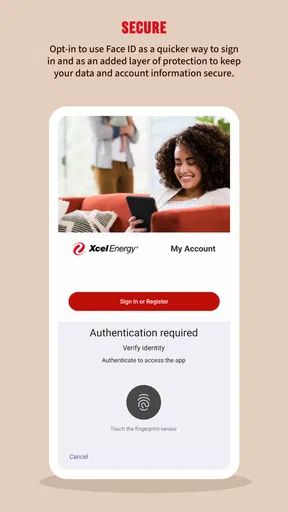
The opening experience is also a reminder that this is a private account tool. The useful content depends on being connected to the right customer profile, so the first practical question is not whether the app looks attractive but whether I can identify the correct account. Households with multiple properties, shared responsibility, or more than one service relationship should slow down at this point and confirm which account they are viewing before taking action.
Moving through the account step by step
Once I am inside the relevant account area, I treat the process as three separate jobs: inspect, decide, and submit. First, I inspect the current account information and any bill details available in the app. Next, I decide whether the information answers my question or whether I need a fuller explanation. Only then do I proceed with the account action. Keeping those stages separate is more reliable than immediately pressing the most prominent button.
For a simple balance check, the flow is pleasantly short. I can confirm that I am looking at the intended account, review the amount presented, and close the app. This is the kind of task where a mobile account manager is clearly more convenient than opening a browser, searching for the utility site, and navigating through a larger desktop-oriented layout.
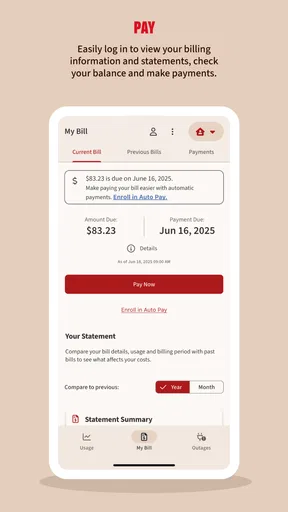
For a payment-related task, I would be more deliberate. I review the account identity and amount before moving forward, then pause again at the final confirmation stage. The app can shorten the route to completion, but convenience should not remove the verification habit. A small screen encourages quick taps, and that is precisely when I want to check the details rather than assume the first screen tells the whole story.
When I am investigating a change in the bill, I use a different workflow. I compare the current information with previous account context where the app makes that available, then ask whether the difference is something the app can explain or merely display. This is an important trade-off: an account app may be excellent for showing the status of a bill while being less satisfying when I need a detailed explanation of unusual usage, a service issue, or a complicated adjustment.
The handoff between the app and the real-world account
The most important handoff is between what appears on the phone and what happens to the actual Xcel Energy account. The app is the interface, but the outcome belongs to the account itself. I therefore treat a completed screen as evidence that I submitted an action, not as a reason to ignore later confirmation or account updates. That distinction is especially useful for anything involving money or a time-sensitive obligation.
There is another handoff between the person using the app and other people in the household. If one person checks the account and another person manages the household budget, the app does not automatically solve that communication problem. I would share the relevant result directly and make clear whether I only viewed the information or completed an action. That simple habit avoids duplicated payments, missed responsibilities, and uncertainty over who handled the bill.
For renters, landlords, roommates, or anyone managing several addresses, the account handoff deserves even more care. The app is most comfortable when one user has a straightforward relationship with one account. A more complicated arrangement can turn a quick check into an identification exercise. I would not rely on memory alone; I would verify the service address or account context shown before making a decision.
The final handoff is to customer support or the wider Xcel Energy service process when the app cannot resolve the issue. A mobile account screen can help me gather the basic information needed for that conversation, but it should not be mistaken for a replacement for every support channel. If the matter involves a disputed charge, a technical problem, or an account situation that does not fit the normal path, moving to a human-assisted route may be more efficient than repeatedly refreshing the app.
What the workflow delivers when everything goes well
The best result is not dramatic: I finish the account task without opening a laptop. That sounds modest, but it is exactly the benefit I want from this type of software. A quick check can settle whether I need to act, and a completed account action can remove a small item from my mental list. The app feels strongest when the question is narrow and the account state is ordinary.
I also like the separation between occasional use and daily dependence. I do not need to keep the app open or build a routine around it. I can use it when a bill arrives, when I want to confirm account information, or when I am away from my usual computer. That makes the free price especially practical: there is little reason not to keep a utility account tool available if I already use Xcel Energy and prefer handling routine tasks on a phone.
Its current version, 1.9.1, gives the app a defined point of reference for anyone deciding whether to install it. I would still keep the operating-system requirement in mind before downloading, particularly on an older Android phone. The app is not demanding in concept, but compatibility is part of convenience; an account tool is not useful if the device cannot run it comfortably.
My preferred workflow ends with a deliberate result check. After completing an action, I look for the app’s confirmation or updated account state, note what I actually did, and only then close it. This is a non-obvious but valuable habit because it turns the app from a place where I tap buttons into a record of a completed task. If the result is unclear, I save myself confusion later by treating the task as unresolved until I can verify it through the available account information.
Where the flow breaks down
The main weakness is the same limitation found in many utility account apps: the smooth path depends on a straightforward request. When I only need routine account management, the focused design is an advantage. When I need a deep explanation, unusual correction, or broader planning help, the experience becomes less complete. I may reach the right account page and still not have the answer that prompted me to open the app.
That matters for people who want energy insights rather than account administration. Someone looking for extensive consumption analysis, detailed household comparisons, or a planning tool may prefer a dedicated energy-monitoring solution or the full web experience, depending on the task. I would not choose this app as my primary tool for studying long-term energy behavior unless its available account information already meets that need.
There is also a human-factors weakness. A small display makes it easy to skim a bill and focus on the largest number. That is fine for a quick status check, but it is not ideal for careful investigation. Users with poor eyesight, complicated accounts, or a need to compare several pieces of information may find a larger screen easier. In those cases, the usual browser route can be better even if it takes a few more steps.
The app is also not the right answer for someone who does not have an Xcel Energy account to manage. Its purpose is tightly connected to the developer’s utility service, so installing it out of general curiosity offers little value. Likewise, people who prefer handling every account matter by phone or desktop may gain very little from adding another access point.
Who will benefit most from keeping it installed
I would recommend it to an Xcel Energy customer who wants a convenient mobile route for ordinary account tasks. It is particularly suitable for someone who checks bills away from home, shares household responsibilities, or wants to confirm account information without remembering a browser login path. The app’s strongest quality is not depth; it is the reduction of friction between “I should check this” and “I know what needs to happen.”
It is also useful for people who manage their finances in short sessions. A person reviewing several household expenses can open the account, confirm the current information, and return to the budget without switching devices. The important technique is to use the app as a focused checkpoint rather than a place to explore aimlessly. That approach makes the experience faster and reduces the chance of acting on the wrong account detail.
I would be more cautious about recommending it to a user with complex service arrangements or a strong need for detailed historical analysis. Those users may still appreciate the mobile access, but they should expect to combine it with another channel. The app can be one part of the workflow without being the entire workflow.
How it compares with the usual alternatives
Compared with using a mobile browser, the dedicated app has the advantage of being a purpose-built entry point. I do not have to search for the service website each time, and the account-management context is clearer. The browser remains more flexible when I need to move between several pages, use a larger screen, or handle a task that feels too detailed for a phone interface.
Compared with calling customer service, the app is faster for routine matters that do not require explanation. I can check information on my own schedule and avoid turning a simple account question into a conversation. The phone remains preferable when the account situation is unusual, when I need clarification, or when the visible information does not match what I believe should be happening.
Compared with a general bill-tracking or budgeting app, this tool has a more direct relationship with the Xcel Energy account. A budgeting app may help me see several expenses together, but it is not the place I would expect to manage the utility account itself. The trade-off is that a general finance tool can offer a broader household view, while this app keeps its attention on the Xcel Energy relationship.
That comparison leads to my clearest recommendation: use this app for access and action, not as a universal replacement for every energy or financial tool. It complements a budget, a browser, and customer support rather than eliminating them. Understanding that boundary makes the app feel more useful because I am judging it by the job it is designed to perform.
Small habits that make account management safer
I would begin every important session by checking the account context before reading the amount. This is especially worthwhile for anyone with multiple addresses or shared household access. The extra moment is less frustrating than discovering after submission that I was looking at the wrong service relationship.
I would also separate “viewing” from “acting.” A balance check does not mean a payment was made, and reaching a payment screen does not mean the account was updated. After any action, I look for a clear completion state and then revisit the account information if needed. This is a simple workflow improvement, but it is more valuable than rushing through the interface.
Finally, I would switch channels when the app stops answering the real question. Repeating the same taps rarely creates a better explanation. If the issue is a confusing charge, a service concern, or an account arrangement outside the normal path, the information gathered in the app can still be useful, but the next step should be the appropriate Xcel Energy support route rather than endless app navigation.
My final assessment
Xcel Energy succeeds as a focused mobile companion for customers who want routine account access in their pocket. I like it most for short, practical sessions: open the account, verify the context, inspect the relevant information, complete the necessary action, and confirm the result. That complete workflow is more valuable than a flashy interface because it addresses a real everyday inconvenience.
My recommendation is positive, with a clear boundary. If you already manage an Xcel Energy account and prefer Android access, the free app is worth trying, especially for quick checks and ordinary account tasks. If you need extensive analysis, complicated account support, or a broad household finance view, keep the website, a budgeting tool, or direct support in your toolkit. For the right user, this is a useful shortcut; for everyone else, it is simply too specialized to justify regular use.
Verdict
Strengths of Xcel Energy
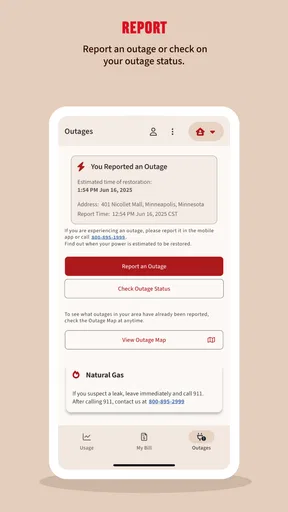
- Convenient outage reporting and restoration updates in one place.
- Paperless billing helps reduce clutter and makes records easy to access.
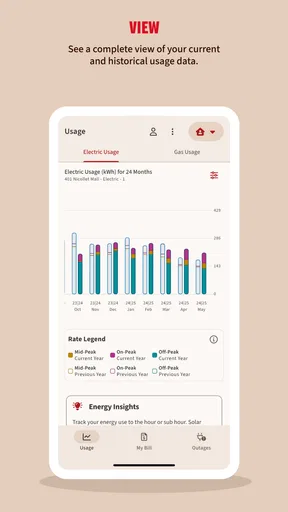
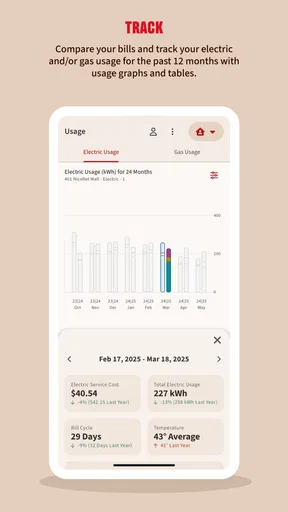
- Usage charts can help customers identify high-consumption periods.
- Multiple payment options make managing monthly bills more flexible.
- Service alerts can provide timely information about planned maintenance.
Limitations of Xcel Energy
- Features and availability may vary depending on your service territory.
- Some users may experience delays when outage information is updated.
- The app requires account registration for most useful features.
- Energy data may not always be detailed enough for advanced monitoring.
- Occasional login or loading issues can make urgent tasks frustrating.
Similar Picks in This Category
View All
LinkedIn: Community & Network
LinkedIn3.8

Zoom Workplace
zoom.com4.1

Microsoft Teams
Microsoft Corporation4.6

Meta Business Suite
Meta Platforms, Inc.4.6

Webex Meetings
Cisco Systems, Inc.4.5

TeamViewer Remote Control
TeamViewer4.4
Frequently Asked Questions
What is the Xcel Energy app used for?
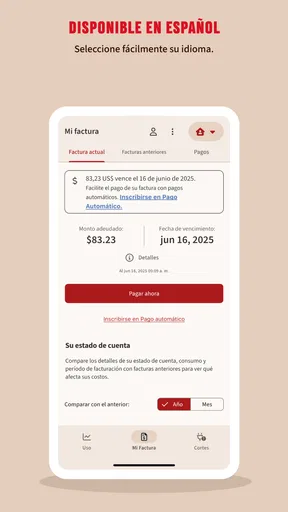
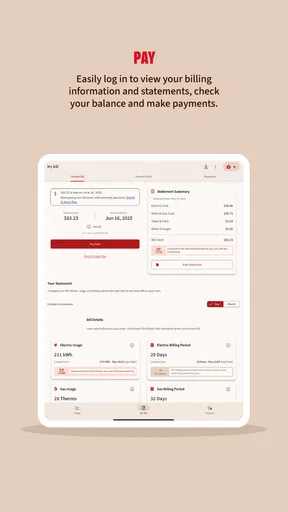
The Xcel Energy app is designed to help customers manage their utility account from an Android or iOS device. After signing in, you can view your current balance, review bills, make payments, check usage information, manage account details, and contact customer support. Available features may vary depending on your service location, account type, and the services offered in your region.
Can I pay my Xcel Energy bill through the app?
Yes, eligible customers can generally use the Xcel Energy app to pay their electricity or natural gas bill. Payment options and processing times may depend on your account and location, but the app typically allows you to review the amount due, choose a payment method, and confirm the transaction. Always check the confirmation screen and your bank account before submitting another payment.
Does the Xcel Energy app show power outages and restoration updates?
The app can provide outage-related information for customers in supported Xcel Energy service areas. Depending on the situation, you may be able to report an outage, view outage maps, follow restoration updates, and receive notifications. Information can change quickly during severe weather, so the app should be used together with official emergency instructions and local safety guidance.
Is the Xcel Energy app free to download and use?
The Xcel Energy app is generally free to download from the official Google Play Store or Apple App Store. However, using certain features requires an active Xcel Energy account and an internet or mobile data connection. Your carrier may charge data fees, and normal utility charges still apply. Download the app only from an official store to avoid unofficial or unsafe copies.
What should I do if I cannot sign in or the app is not working?
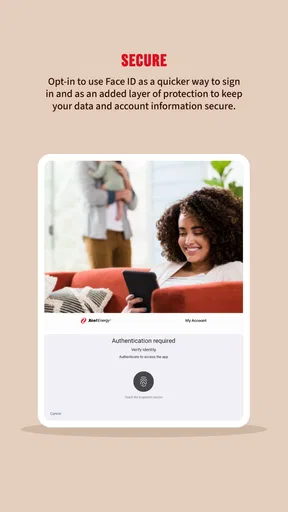
If you cannot access the Xcel Energy app, first check your internet connection and confirm that you are using the correct account credentials. Updating the app, restarting your device, or reinstalling it may resolve temporary problems. If an outage or payment issue is urgent, use the official Xcel Energy website or customer service channels, and never share your password or verification codes with anyone.
